Hosting: (INGLES) How to configure Contact Form hosted with us
Probably the main issue that email service providers face is spam. Therefore email service providers and hosting companies have to manage different anti-spam services/ filters and put restriction in order to prevent sending spam from their servers and protect their customers and other users.
Our email service is configured to check public spam lists, such as SpamCop, SpamHaus, etc. We also have SpamAssassin installed on our servers which you can easily enable and configure through your cPanel. Check How to configure SpamAssassin article for more information. Recently we have implemented a new feature on our shared servers called Rewrite From: header to match actual sender. It was done to improve the validation of email senders on our servers that will allow us to deal with spamming activity more efficiently in this way.
Also we have disabled sending emails from email address on the domain that does not exist on the server or uses third-party email service at the moment. We have taken these measures due to mass SPAM sending through forums, guest books, and contact form scripts on our servers.
And since many customers have contact forms at their web-sites configured for using third-party email accounts or services, sometimes it might have resulted in improper functionality of mail forms and similar services, unfortunately.
Sometimes when you use Gmail, Outlook or Yahoo email address on a website contact form the attempt to access your account may be blocked. This is because some of the most popular free email services reject successful login attempts, originating from unusual locations.
In this guide you will find tips and tricks on how to temporary disable this restriction or add our server to whitelist. The instructions provided in this article should help you to create and smoothly use your contact form for a web-site hosted with Namecheap.
Email account should be created on our hosting server
1. For domain you are going to use with your mail form Email Routing should be set to Local Mail Exchanger: 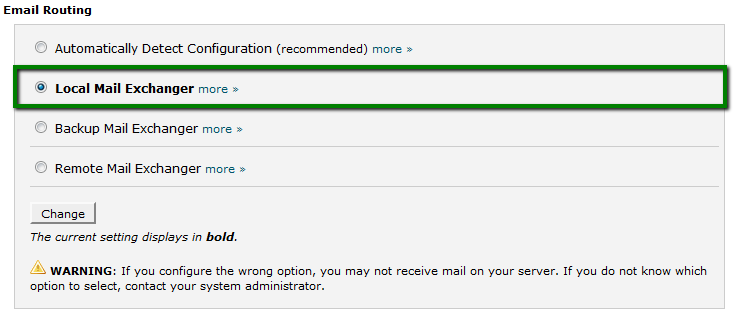
2. You may create MX record pointed to your main domain (if it is pointed to the server IP) or directly to the server. You can find server name using this article: 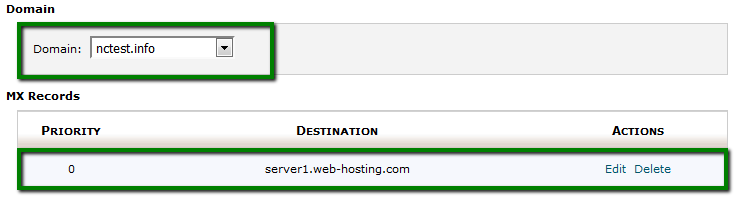
$email_from = $_POST['email'];
$email_from = "you@yourdomain.com";
$headers = "From: $post_email"; etc.
$mail_to_send_to = "name@anydomain.tld";
$your_feedbackmail = "from@yourdomain.tld";
$sendflag = $_REQUEST['sendflag'];
if ( $sendflag == "send" )
{
$email = $_REQUEST['email'] ;
$message = $_REQUEST['message'] ;
$headers = "From: $your_feedbackmail" . "\r\n" . "Reply-To: $email" . "\r\n" ;
$a = mail( $mail_to_send_to, "Feedback Form Results", $message, $headers );
if ($a)
{
print("Message was sent, you can send another one");
} else {
print("Message wasn't sent, please check that you have changed emails in the bottom");
}
}
?>